It opens instantly
Straight to the home screen with every mode one tap away. No splash screen, no ads, nothing to dismiss while you're standing in the dark.
A flashlight that dances to your music.
Everything you want from a torch — a flashlight you can dial in, a strobe, an SOS signal and a full-screen lamp. Then hand it a song and watch the light pulse on the beat. No account, no sign-up, and nothing leaves your phone.
Why Club Lights
Most phones already have a torch button. Club Lights is for the moments where that isn't enough.
Straight to the home screen with every mode one tap away. No splash screen, no ads, nothing to dismiss while you're standing in the dark.
A torch, a strobe, an SOS beacon, a full-screen lamp and a beat-synced light show — instead of five apps that each do one of them.
No account, no sign-up, no analytics, no profiling. Your settings stay on the device and we run no servers to send anything to.
Everything runs on the device, so it works on a plane, underground, deep in a field, or in the middle of a power cut.
Every mode
One app covers the practical jobs and the good nights out. Here is what each mode does, what it looks like, and the situations people actually reach for it in.
Steady light, exactly as bright as you need
The straightforward torch, but with a strength control instead of a single on/off button. Turn it down low to read a label, a menu or a meter without dazzling yourself, or open it right up to light a path or a whole room. On phones whose LED supports variable brightness the slider changes the real output; where the torch is on-or-off only, it runs at full — a hardware limit we explain in the FAQ.
Use it when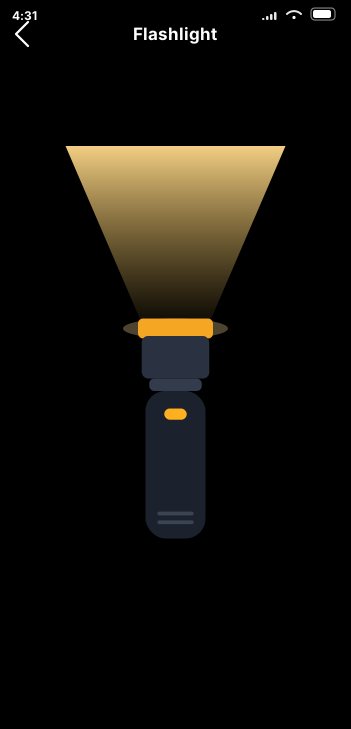
A blink fast enough to be impossible to ignore
A flash that pulses at a rate you set — Slow, Medium, Fast or Rapid — with the exact figure shown in flashes per second, like 4.2/s, so you can find a setting again instead of guessing. A slower blink carries further at night and uses less battery; a rapid one is far harder to ignore up close. The red Stop button is large and always in the same place.
Use it when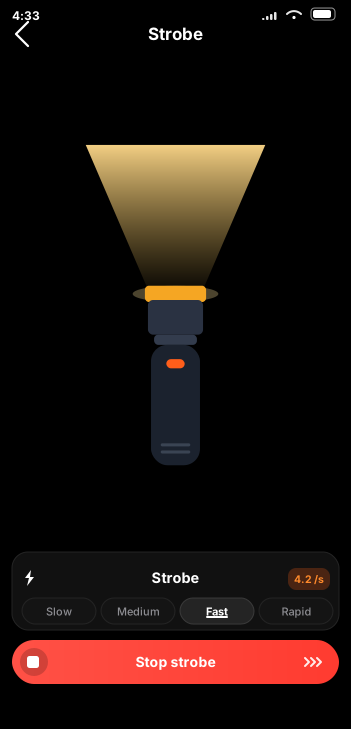
The distress call, timed properly, for as long as you need
Three short flashes, three long, three short — the internationally recognised Morse distress call — repeating with the correct timing and the correct gaps between letters. Holding that rhythm by hand while you are cold, hurt or frightened is genuinely hard; the app holds it for you and keeps going while your hands are busy. Slow, Normal and Fast match the conditions, and the screen shows the pattern as it transmits.
Use it when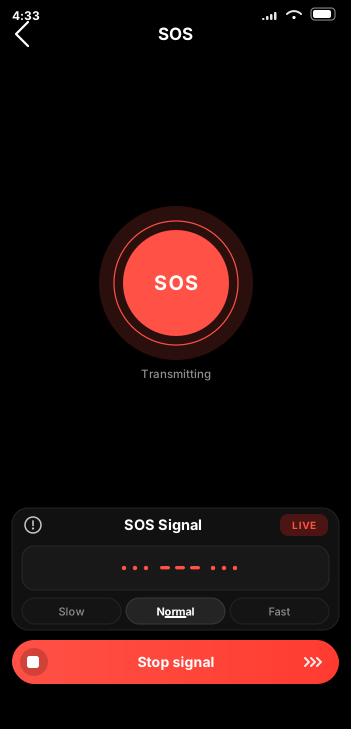
The whole display as a soft, wide lamp
A hard LED point is the wrong light for anything close to your face. Screen Light turns the display into a broad, even panel instead. Six presets set it up for the job — Reading, Writing, Makeup, Video call, Relax and Night — and seven colours run from Daylight and Cool through Warm and Amber to a deep red Night mode that keeps your eyes adjusted to the dark.
Use it when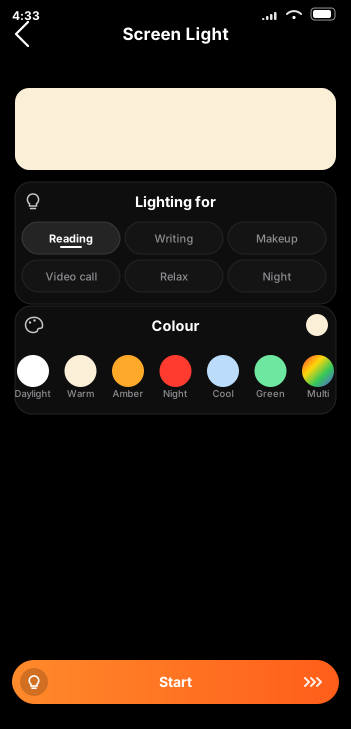
The flash locked to the beat of the track
Give it a song and it listens as the music plays, finds the beat, and fires the light on every hit — so the flash lands with the kick drum rather than blinking on its own timer. Brightness follows the pitch: low bass gives a deep, heavy glow, higher notes flash bright and sharp. Send the pulses to the LED or to the whole screen, and feed it a track from your phone or the room through the microphone.
Use it when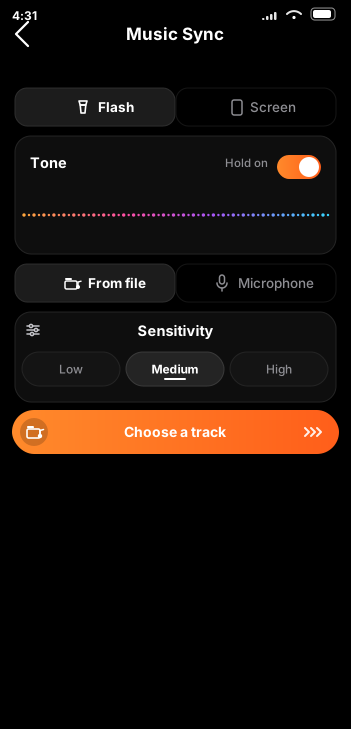
Music Sync in detail
Most "disco light" apps just blink on a timer, which drifts out of time within a few bars. Club Lights listens to the actual audio and reacts to what the track is doing, moment to moment.
As the track plays, the app reads its waveform and picks out the beat — the percussive hits that give a song its pulse. Each one triggers the light, so the flash lands with the kick drum instead of running on its own clock. When the track drops or the tempo changes, the light changes with it.
How hard the light hits depends on the tone of the note behind it. Low, bassy sounds — kick drums, sub bass, deep synths — come through as a deeper, heavier glow. Higher sounds — hi-hats, snares, vocals, lead lines — flash brighter and sharper. That is what stops it looking like a smoke alarm: the light has light and shade in it, because the music does.
Feed it a track from your phone with From file, or point it at the room with Microphone and let it follow whatever is already playing — a speaker, a DJ, a car stereo, a band. Then send the result to the Flash for a sharp point of light, or to the Screen to turn the whole display into a colour panel. Sensitivity — Low, Medium or High — trims how eagerly it responds, so a sparse track and a loud room can both be dialled in.
All of this happens on your phone, in the moment. The audio is analysed as it plays and thrown away immediately — nothing is recorded, stored or uploaded. See exactly what the audio permission does.
How it works
Four steps from opening the app to a room lit in time with your music. Only the first two are needed for a plain torch.
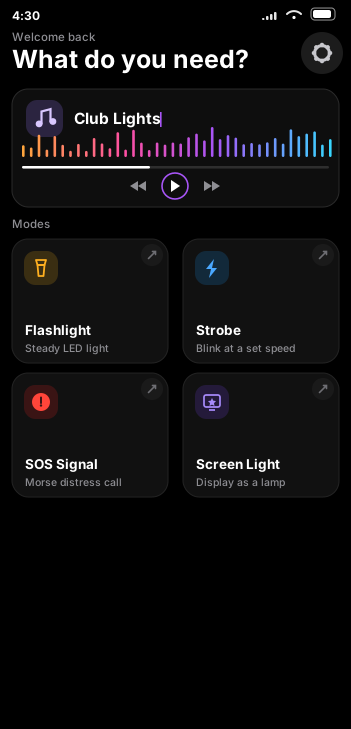
The home screen shows four cards — Flashlight, Strobe, SOS Signal and Screen Light — plus the Club Lights music card at the top. Tap one and you're in.
Set beam strength on the flashlight, a Slow-to-Rapid rate on the strobe, Slow, Normal or Fast on the SOS signal, or a colour and purpose preset on Screen Light.
Tap the Club Lights card to open Music Sync. Choose From file and pick a track, or switch to Microphone to follow whatever is already playing in the room.
Send the beat to the Flash or the Screen, set sensitivity to Low, Medium or High, and the lights pulse in time. One tap stops everything.
Questions
The things people ask most before downloading. There are more answers, including troubleshooting, on the support page.
Only for Music Sync, and it is worth explaining properly because it looks odd at first glance. To pulse the light in time with a song, the app has to read the shape of the audio. On Android that goes through the system Visualizer API — and the operating system puts that API behind the audio permission even when no microphone input is captured at all. The same permission also powers the optional Microphone mode, which follows music playing in the room.
In both cases the audio is analysed on your device as it plays and discarded immediately. Nothing is recorded, stored or transmitted, and we operate no servers to send it to. Decline the permission and the Flashlight, Strobe, SOS and Screen Light modes all still work. Full detail in the Privacy Policy.
No. There is no account and no sign-up, no analytics, no tracking, no advertising and no third-party SDKs. Your settings stay on your device, and we run no servers, so there is nowhere for data to go. Nothing is shared with or sold to anyone.
The app reads the audio as it plays and picks out the beat — the percussive hits that give a track its pulse — then fires the light on each one, so the flash lands with the kick drum instead of blinking on a fixed timer. Brightness follows the pitch: low bass gives a deeper, heavier glow, while higher notes flash brighter and sharper. You choose whether the pulses drive the LED or the whole screen.
Yes — switch the source to Microphone. The app then listens to whatever is playing around it, so it works with a streaming app, a Bluetooth speaker, a car stereo, a DJ or a live band. You do not need to own the file. Use From file instead when you want to play a track stored on your phone through the app itself.
Because not every phone's LED can be dimmed. Variable torch brightness needs support from both the hardware and the operating system, and on many Android devices the torch is simply on-or-off — no app can change that. Club Lights detects this and falls back to full brightness. Screen Light brightness is always adjustable, because that is the display rather than the LED.
Flashing light can trigger seizures, dizziness or disorientation in people with photosensitive conditions, sometimes with no previous history. Do not use the Strobe or Music Sync modes around anyone who may be affected, and stop immediately if anyone feels unwell. Never aim flashing light at drivers, cyclists, pilots or anyone operating machinery. Please read the full safety notice before using these modes.
Yes, entirely. Every mode runs on the device, including Music Sync, so the app works on a plane, underground, on a hill with no signal, or during a power cut when the router is down with everything else.
Yes. It is free to download and use on Android and iOS, with no adverts, no subscription and no in-app purchases. It is developed by SRCHOUT Software.
Club Lights has no account and no sign-up. It collects no personal information, runs no analytics, and builds no profile of you. Your settings stay on your device. We operate no servers, so there is nowhere for your data to go.
The app asks for audio permission only for Music Sync — audio is analysed in real time on your device and discarded immediately. Nothing is recorded, stored, or transmitted. It never asks for camera permission and cannot take photos or video.